flowchart LR
A[Local repo<br/>on TrueNAS] -->|git push| B[GitHub<br/>private repo]
A -->|docker compose up| C[Running stacks]
D[Dockhand] -->|auto-updates images| C
C -.ZFS snapshots.-> E[Snapshot dataset]
style A fill:#2d3748,stroke:#4a5568,color:#fff
style B fill:#1a365d,stroke:#2c5282,color:#fff
style C fill:#22543d,stroke:#2f855a,color:#fff
So, this year I’ve gone down the homelabbing rabbit hole!
I’ve wanted to give it a go for a while now, but increasing frustration using common software products with predictably rapidly declining quality combined with the realisation of how many old DIY computers I’ve accumulated pushed me over the edge.
This started with me repurposing the first desktop PC I ever built into a NAS via TrueNAS, which has a lovely free community edition.
One of the first things I wanted to setup was immich, a self-hosted and open-source Google Photos replacement. Given that this was precious data I’d want redundancy for, I immediately planned to have 2 TrueNAS servers, one at my parents place as a replication target, and one at my place, each with at least 3 hard drives with one drive for redundancy in each.
AI craze destroys my hardware ambitions
So I decided to setup the remote system first as I happened to be visiting my parents and so could take the desktop with me. This worked fine, I only needed to buy 3 16TB hard drives, which wasn’t too bad in good old days circa September 2025, I managed to get them for around £160 each on sale. Then I just needed to save a few more pennies to buy a further 3 16TB drives and I could setup the local desktop (the second DIY desktop I built years ago).
Let’s just mosey on over to check hard drive prices!
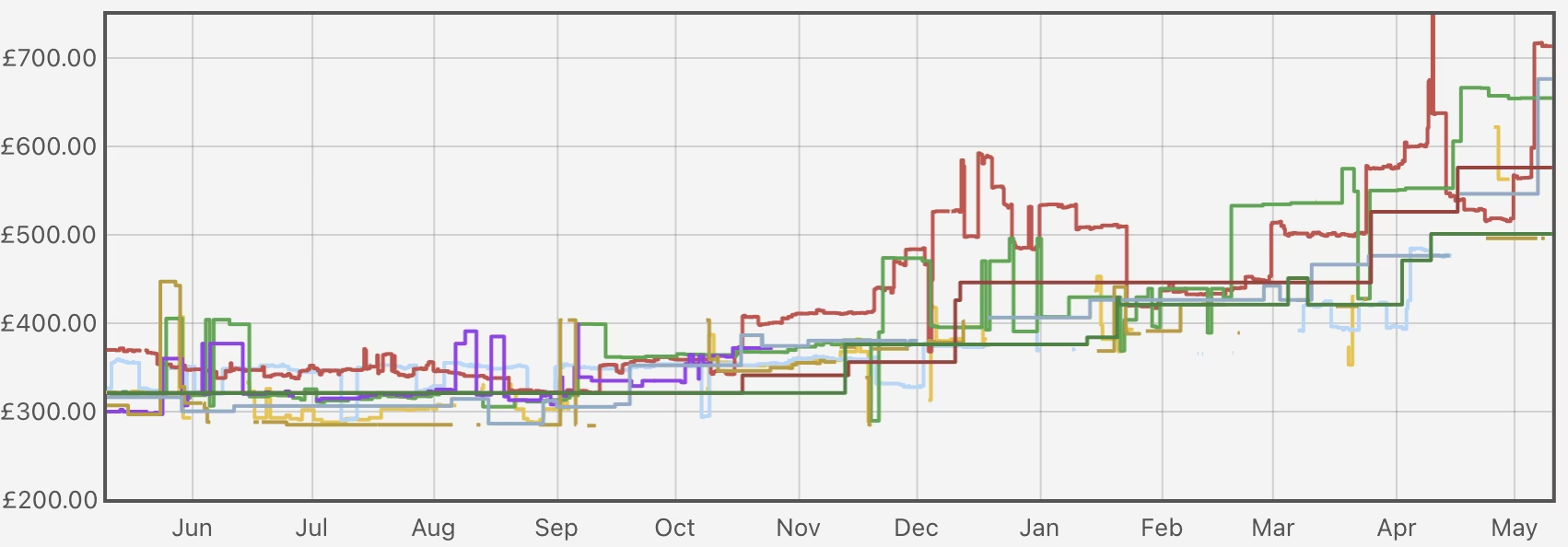
Oh dear…
So in the interim the AI craze has exploded the price of not just RAM, but also hard drives now, so that’s just great.
For now I’m gonna wait and see if prices start to come down, but if they stay high I’ll likely migrate the remote drives locally and just make the replication target smaller :shrug:
On a brighter note, I did manage to snag a Dell Wyse 5070 and a 10Gb quad port network card for it, which I’ve setup as a very nice pfSense router with pfBlocker-NG.
Most recently I got a little HP ProDesk 400 G5, and I’m planning to install Proxmox to play around with Kubernetes to learn something new!
Deploying software
Since my only NAS for the time being was going to be remote, I opted for Tailscale for remote access, so I first installed that as an app, and then did the same for immich. Since then, I’ve gotten much more into using docker compose to manage stuff, so I first started with Dockge, which is very nice and beginner friendly, but have since migrated to Dockhand as it’s a bit more powerful (the ability to schedule auto-updates is very handy!).
At first I was just experimenting with docker compose files I’d edit in the Dockge/Dockhand GUIs directly, but this felt very crude with no history, no backup of the intent behind my setup, and a vague sense of dread every time I changed something I might want to undo later, or just remember why on earth I setup something the way I did.
So I’ve now migrated my configs to a GitHub repo.
Why bother with git?
ZFS snapshots already cover the state of things nicely (and they’re great), but they don’t tell me why I added a particular environment variable three months ago, or what that weird volume mount was for. That’s a job for git. The goal was modest: get every Docker Compose file, every meaningful config, and a bit of documentation into a repo, without turning a hobby into a second job. No Kubernetes, no fancy GitOps reconciliation, no Ansible. Just version control and good hygiene.
Here’s the rough structure I landed on:
homelab/
├── README.md
├── docs/
│   └── architecture.md
├── truenas/
│   └── docker-compose/
│       ├── adguardhome/
│       ├── arr-stack/
│       │   ├── docker-compose.yml
│       │   ├── .env.example
│       │   ├── README.md
│       │   └── configs/
│       │       └── qbit/wireguard/wg0.conf.example
│       └── swag/
└── proxmox/   # placeholder for future me
Each stack lives in its own directory with its compose file, a sanitised .env.example, a README explaining what the stack does and any quirks, and example configs where useful. The READMEs are mostly notes-to-future-me, things like “this needs the VPN container to be up first” or “don’t forget to chown the config dir.” Boring but important stuff that I will absolutely forget within a fortnight.
Keeping secrets out of the repo
The obvious gotcha with putting your homelab in git is that compose files love to reference API keys, passwords, and assorted things you really don’t want on GitHub. Even on a private repo one wrong click and it’s public, and once a secret has been pushed it’s basically burned forever.
The setup I went with:
- A
.gitignorethat excludes anything ending in.env, plus specific config files I know contain secrets (likecloudflare.inifor SWAG’s DNS challenge) - Sanitised
.env.examplefiles committed alongside, so future-me knows what needs to be set without seeing the actual values - gitleaks wired up as a pre-commit hook, which scans every commit for things that look like secrets before they’re allowed in
Gitleaks caught me out almost immediately, but with a false positive! The default LSIO Cloudflare config example contains a placeholder API key (0123456789abcdef...) that’s clearly not real, but matches Cloudflare’s key format. A quick .gitleaks.toml allowlisting that specific commit fingerprint sorted it out. Better a noisy false positive than a quiet leak.
The elephant in the room: my git repo isn’t actually connected to my server
Here’s the slightly embarrassing bit: right now my workflow is “edit locally, push to GitHub, SSH into TrueNAS, pull the repo, redeploy the stack.” The repo is essentially documentation and backup, not a deployment mechanism. If I edit a compose file in the Dockhand GUI in a hurry, that change doesn’t make it back to git unless I remember to do it manually. Not ideal.
The proper fix is something GitOps-ish, a tool that watches the repo and reconciles the running stacks against it. Komodo looks like the sweet spot for a Docker Compose homelab from what I can tell. A lighter-weight option is just a webhook from GitHub triggering a pull-and-redeploy script on the TrueNAS box. Both are on the list.
It’ll be interesting to explore what the best approach for dealling with Kubernetes deploys I’ll be playing with in future as well!
For now though, “git as a logbook” is already a huge improvement over “edit live and pray.”
The other elephant: secrets aren’t really in git either
Dockhand has a nice feature where you can flag environment variables as secrets, and it stores them encrypted in it’s database rather than as plaintext in the compose file on disk, and then it injects the secrets as shell environment variables to docker compose. Good for security! Slightly awkward for backups, because those secrets now live only in Dockhand’s state, not in my git repo and not in any plaintext file I can easily back up (though in theory my TrueNAS snapshots will include the Dockhand database).
This means my repo isn’t actually a complete recovery artifact, so if I lost the TrueNAS box tomorrow, I’d need to re-enter every secret by hand from my password manager. Manageable at my current scale, but not exactly elegant.
The “proper” solution is SOPS: you encrypt secrets with an age or GPG key, commit the encrypted blobs to git, and decrypt them at deploy time. Then the repo becomes self-sufficient and anyone with the private key (i.e. future me, with a backup) can rebuild the homelab from a fresh clone.
It’s on the list, but I already have a lot of things on the list, and if I trying not to let the perfect be the enemy of the good. This is an important point, because I’m self-taught here and this is a lot to learn, it’d be easy to get sense of the perfect but then be overwhelmed and just struggle to get started. This way I get to learn a lot gradually as I go, and hopefully get the more professional setup later (that’s the plan at least!).
Where this leaves me
So the current state is:
| Layer | Approach | What it covers |
|---|---|---|
| Config & intent | Git repo (private GitHub) | What’s running, why, and how it’s wired up |
| Live state | ZFS snapshots on TrueNAS | Databases, container volumes, the actual data |
| Off-site | (planned) ZFS replication to a second box | Surviving total loss of the primary |
| Secrets | Dockhand + password manager (SOPS planned) | Keeping creds out of git |
| Deployment | Manual git pull + redeploy (Komodo planned) |
Getting changes from the repo to the running system |
It’s not finished. It’s probably never going to be finished, because that’s sort of the point of a homelab. But it’s a solid foundation, and writing it down here means I’ll actually remember what I did when something inevitably catches fire in six months.
If you’re running a homelab and haven’t put it in git yet: do it this weekend. It’s a few hours of work and it genuinely changes how you think about your setup.