This is part 2 of a four-part series, start here if you missed the beginning. Part 1 brought up the Talos cluster. This part is about turning it from a cluster into a system you operate via git.
Why Flux (and not Argo)
Both Flux CD and Argo CD are good. I picked Flux for three reasons:
- It’s lighter. Flux is a set of controllers; there’s no web UI baked in. For a homelab I don’t actually want a separate UI, I want
git pushto be the deployment workflow, full stop. - Its SOPS integration is first-class. The
decryption:block on aKustomizationjust works. - The pull model fits the homelab. The cluster polls git on its own schedule; I don’t need to expose anything to the internet for CI to push to it.
The trade-off is that there’s no dashboard to look at. I use flux get all -A and kubectl describe and that’s been fine.
I may well try Argo just to get a feel for it as some point in the future though.
Bootstrapping, the boring way
The Flux docs walk you through flux bootstrap github, which takes a Personal Access Token and writes the Flux manifests into your repo for you. I used it once, then immediately regretted not understanding what it had done, so I committed the output and read every file. The two manifests that matter are gotk-components.yaml (the Flux controllers themselves) and gotk-sync.yaml (the GitRepository + Kustomization that points back at the repo).
After that, my repo layout looks like this:
kubernetes/clusters/talos/
├── flux-system/
│   ├── gotk-components.yaml   # The Flux controllers — don't hand-edit
│   ├── gotk-sync.yaml         # GitRepository + flux-system Kustomization
│   └── kustomization.yaml     # Lists the two above
├── sources.yaml               # → kubernetes/infrastructure/sources/
├── infrastructure.yaml        # → kubernetes/infrastructure/
└── apps.yaml                  # → kubernetes/apps/
The split into three Kustomizations (sources, infrastructure, apps) is the most important thing I figured out. Without it, Flux tries to apply a HelmRelease before its HelmRepository exists, fails, retries, fails again, and you get to learn what Flux looks like when it’s mad at you.
With it, each layer dependsOn the previous one, and wait: true blocks until all the resources in a layer are Ready before the next layer starts:
# kubernetes/clusters/talos/infrastructure.yaml
spec:
  path: ./kubernetes/infrastructure
  prune: true
  wait: true
  timeout: 5m
  dependsOn:
    - name: sources
A clean rollout from an empty cluster now comes up in the right order without any manual kubectl intervention, which is exactly what GitOps is supposed to do but doesn’t necessarily do out of the box.
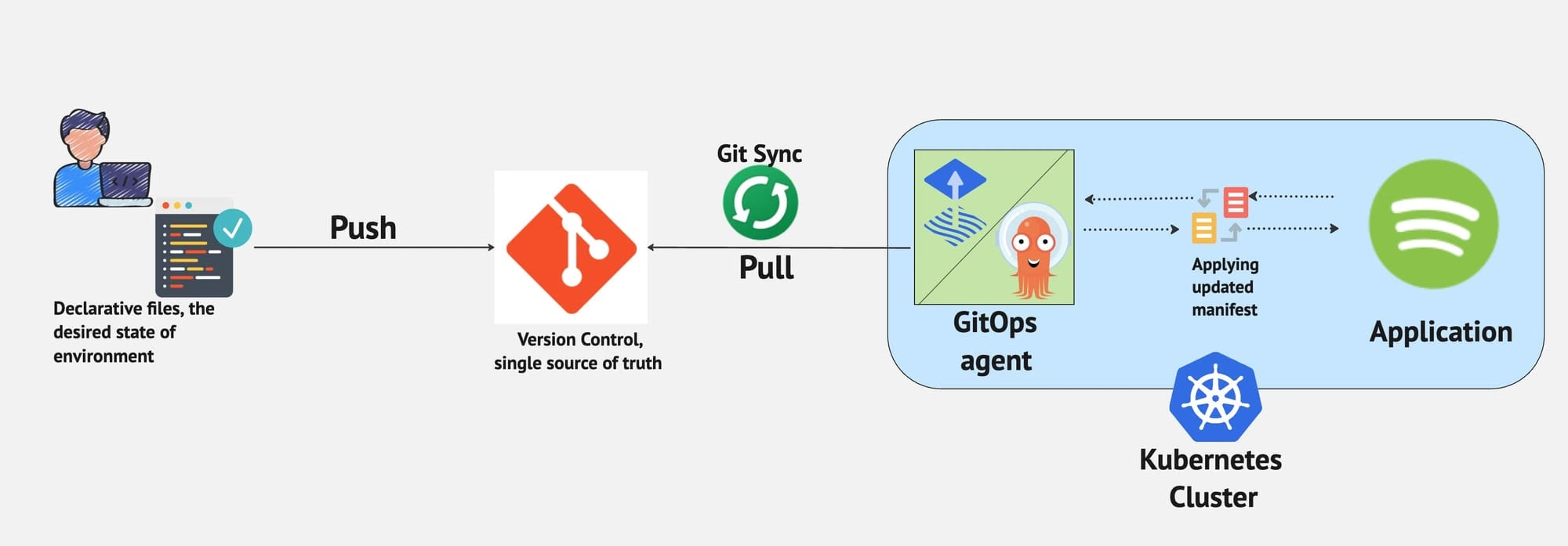
The bits of GitOps that only make sense once you’ve done it
A few things took me an embarrassingly long time to internalise:
- Prune is the magic. With
prune: true, if I delete a file from git, the resource is deleted from the cluster on the next reconcile. The repo is the actual source of truth. Without it, git is a historical record of what you’ve applied, useful, but not load-bearing. - You want loud failures. Setting
timeout: 5mandwait: truemeans aHelmReleasethat fails to come up eventually causes its parentKustomizationto fail loudly with a status I can see influx get all -A. The default (“keep retrying quietly”) buried failures and I’d notice them hours later. HelmReleaseremediationis your friend. Three retries on install and upgrade catches transient issues without me having to lift a finger. Catches the things I’d otherwise be reconciling manually at 11pm.
The way I add a new workload now is mechanical:
mkdir -p kubernetes/apps/<ns>/<app>
# Write namespace.yaml, helm-release.yaml (or plain manifests),
# kustomization.yaml listing them
git add -A && git commit -m "feat: add <app>" && git push
# Wait one minute, run `flux get all -A`, done.
That mechanical-ness is the thing I was after when I started this. It’s probably not the sexiest version of doing GitOps, but for a first attempt I find it very cool!
SOPS + age: encrypted secrets in git
The single most useful thing I added is SOPS with age for secret encryption. Here’s how it works at the 500-foot level:
age-keygenproduces a keypair. The public key goes into.sops.yamlat the repo root, this is safe to commit, that’s the whole point of public-key crypto.The private key is loaded into the cluster once, as a Kubernetes
Secretin theflux-systemnamespace:kubectl create secret generic sops-age \ --namespace=flux-system \ --from-file=age.agekey=./age.agekeyAfter that, I delete the local copy and keep a printed backup in a sealed envelope. The “you got hit by a bus” recovery path.
Every
Kustomizationthat needs to decrypt secrets has adecryption:block pointing at that Secret:decryption: provider: sops secretRef: name: sops-ageI name secret files
*.sops.yamland encrypt them in place:sops --encrypt --in-place \ kubernetes/apps/monitoring/grafana-admin-secret.sops.yamlFlux fetches the file, decrypts it in-cluster using the age private key, and applies the resulting
Secret. The plaintext never touches disk anywhere except inside the cluster’s memory.
This is one of those things where reading about it took longer than implementing it. Setting it up properly took maybe an afternoon, and it has paid for itself many, many times since.
This YouTube video is a nice basic guide:
The pre-commit safety net
Here’s the part I’m proud of. gitleaks is good but it’s not SOPS-aware: if I create a new .sops.yaml file with plaintext in it, gitleaks will probably catch the high-entropy strings, but only “probably”. I wanted “definitely”.
So I wrote a deterministic check in scripts/check-sops-encrypted.sh: any staged file matching *.sops.yaml that doesn’t contain a sops: block fails the pre-commit hook with a clear error. SOPS adds the sops: block when it encrypts a file; an un-encrypted file simply won’t have one.
The pre-commit config wires it in:
- repo: local
  hooks:
    - id: check-sops-encrypted
      name: Check .sops.yaml files are encrypted
      entry: scripts/check-sops-encrypted.sh
      language: script
      files: '\.sops\.yaml$'
Together with gitleaks running on the rest of the tree, I have two independent layers protecting against accidentally committing a plaintext secret. They cover different failure modes — gitleaks catches known secret patterns anywhere; the SOPS check catches missing encryption on files I intended to encrypt. Either one on its own has gaps. Both together don’t.
I have not (yet) had either hook catch a real secret. I would like to keep it that way.
What you have at the end of Part 2
A cluster that’s actually managed by git. You can:
- Add a new workload by creating a directory and pushing.
- Remove a workload by deleting the directory and pushing.
- Roll back any change by reverting the commit.
- Store secrets in the same repo, encrypted, with two layers of pre-commit protection against leaks.
Now we’ve got something to run things on, you might be tempted,
as I was, to run things on it. That’s where the wheels came off for a while. That’s Part 3.