This is part 3 of a four-part series. Index · Part 1 brought up the cluster. Part 2 put it under GitOps. This is the part where I tried to give the cluster network access to the rest of the homelab, and accidentally rewrote my Tailscale ACL three times in one evening.
If you only read one part, read this one. The other parts could have been blog posts; this one was an experience.
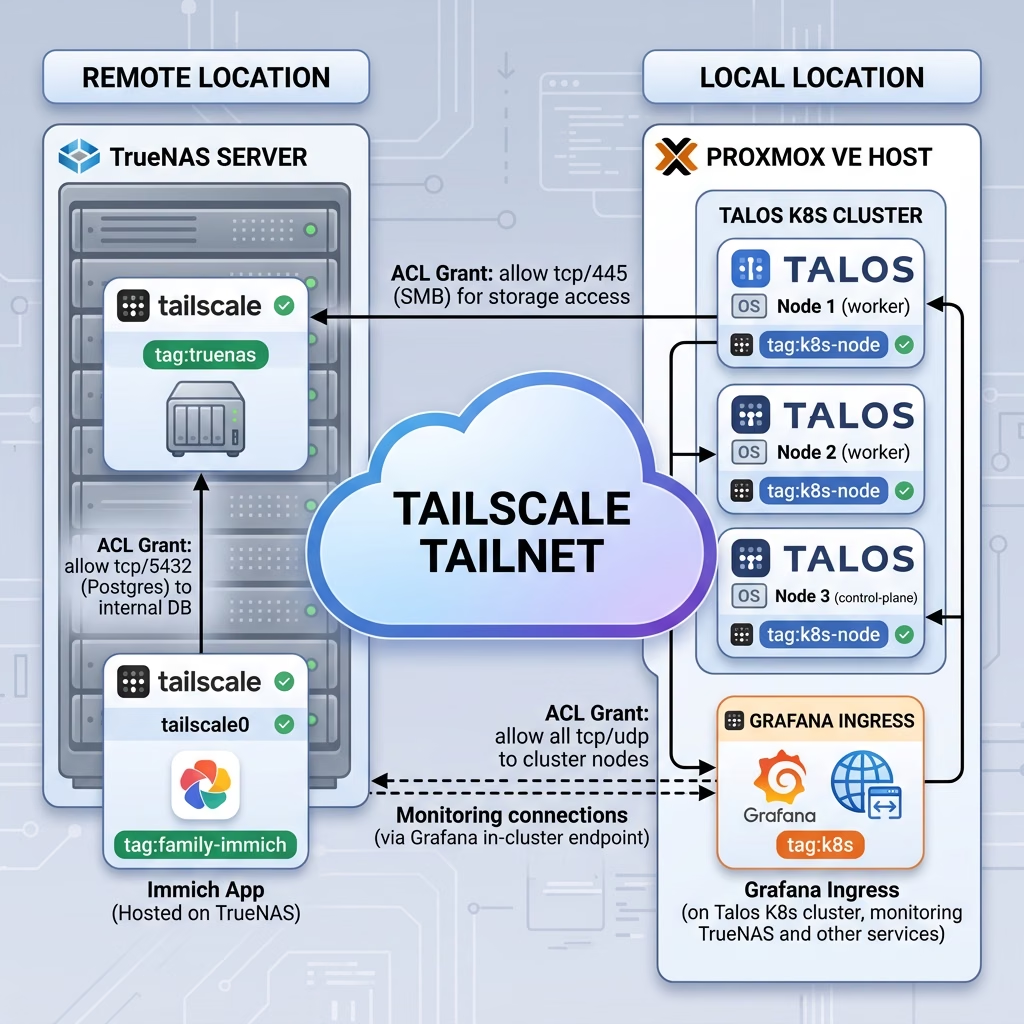
The starting point
Before any of this, my Tailscale model was:
- TrueNAS host owned by my user account, visible in the tailnet as
truenas. - All my personal devices owned by my user account.
- One family member invited as a user, with their devices also on the tailnet.
- Several other family members having the
truenasmachine shared with them, with ACL limiting them to just the Immich port
To share Immich with family, I’d used Tailscale’s node sharing to share the TrueNAS host with each family member. This worked, but it still felt uncomfortable to think about what could happen if one of their devices became compromised… It also limited my ability to use tags for the TrueNAS host without complicating the sharing of Immich.
I wanted three things to be true at once:
- Kubernetes nodes should be able to mount NFS from TrueNAS.
- Family members should be able to reach only Immich — ideally without me having to maintain per-port ACL rules every time I added a service.
- Future-me should be able to expose Kubernetes-hosted services (Grafana, eventually Home Assistant and more) over Tailscale, with sane per-service URLs.
Achieving all three of those at the same time turned out to need four separate fixes. None of them were independently hard. The combination ate a couple evenings.
I was inspired along this journey by a couple videos put out by Tailscale themselves, namely this one that got me excited to try Talos Linux:
and this one where I learned about a cool way to employ a tailscale sidecar I’ll talk more about later:
Stumbling block 1: the tag split
The first thing I tried was: “right, I’ll put a tag on the Talos nodes, give the operator a tag for its Services, and write ACL grants between them.” Easy.
It was not easy. Here’s where I went wrong.
The Tailscale Kubernetes Operator uses an OAuth client to provision Tailnet devices for each Ingress you create. The tag those devices get is set by oauth.defaultTags (in Helm values) or by per-Ingress annotations. I’d set this to tag:k8s, and the OAuth client’s authorised tags also included tag:k8s. Fine so far.
But the first issue was that I didn’t actually understand the difference between the Tailscale extension you can install onto Talos itself, and the Tailscale operator that lives inside Kubernetes.
As I mentioned earlier, one of my main sources of inspiration for this project was a video from Tailscale’s lead developer advocate, Alex Kretzschmar. In the video, he actually explicitly advises against installing the Tailscale Talos extension in the base OS image unless you absolutely need it, because it can lead to networking clashes later on.
But I did need it, and I didn’t realise why until I tried to mount my TrueNAS NFS shares.
Here is the difference between the two tools:
- The Talos System Extension (
siderolabs/tailscale): This runs at the host operating system level. It joins the actual bare-metal Talos node (the physical computer) to your Tailnet. You need this if the node itself needs to reach Tailscale resources—like, for example, thekubeletprocess needing to mount an NFS share from an off-site TrueNAS box. - The Tailscale Kubernetes Operator: This runs inside your Kubernetes cluster as a series of pods. It has absolutely no idea about the host operating system. Its job is to manage traffic flowing in and out of the cluster. It creates Tailscale egress proxies so your pods can reach the Tailnet (like my
democratic-csipod hitting the TrueNAS API), and it creates ingress proxies to expose your internal web UIs (like Grafana) to the Tailnet.
Stumbling block 2: kubelet picked the wrong nodeIP
Right after rolling out the siderolabs/tailscale extension, the cluster broke. flux get all -A started returning timeouts. kubectl logs from my laptop took thirty seconds and then failed.
Here’s what had happened. When tailscale0 came up on each Talos node, kubelet picked the new interface’s IP, a 100.x.y.z Tailscale address, as its nodeIP. Kubernetes node-to-node traffic then tried to route over the tailnet, including via DERP relays when a direct connection wasn’t available. Everything became extremely slow.
The fix is a one-file patch:
# proxmox/patch-node-ip.yaml
machine:
  kubelet:
    nodeIP:
      validSubnets:
        - 192.168.1.0/24
…applied with talosctl patch machineconfig, followed by a reboot of each node. Now kubelet picks the LAN IP, node-to-node traffic stays on the LAN, and the tailnet is purely an egress path for NFS and a few other things.
This one is now part of my baseline machine config, so it only ever needs to be applied again if I add a new node or rebuild an existing one. I made sure to document the full procedure is in the homelab repo for good old future-me (that guys owes me so much…).
The lesson here is one I keep relearning: when you add an interface to a host, something somewhere will probably try to use it for the wrong purpose by default. Always check what kubelet (and routing tables, and /etc/resolv.conf) think the new interface is for.
Stumbling block 3: the democratic-csi controller couldn’t reach TrueNAS
With nodes on the tailnet and ACL grants in place, NFS mounts from the kubelet worked fine. I deployed democratic-csi as the NFS provisioner, pointed it at TrueNAS, and watched it fail to create a single PV.
The issue: democratic-csi has two parts.
- Node pods, which run on each Talos node and do the actual mount syscalls. These were fine — kubelet is on the host network, the host can route to TrueNAS over
tailscale0. - Controller pod, which talks to the TrueNAS HTTPS API to provision and destroy datasets. The controller was running in the cluster’s pod network, which doesn’t have a route to the tailnet.
The fix required understanding that these are two different network paths. I had two options:
The “dirty” fix: Set controller.hostNetwork: true in the democratic-csi Helm values. This forces the controller pod onto the node’s network namespace, allowing it to piggyback on the Talos System Extension’s tailscale0 interface just like the node pods do. It works, but granting host network access to random pods is bad practice and feels messy.
The “clean” Kubernetes-native fix: Keep the controller securely inside the pod network, and use the Tailscale Operator to build a bridge.
To do this, I created an ExternalName Service annotated for the Tailscale Operator:
apiVersion: v1
kind: Service
metadata:
  name: truenas-tailscale
  namespace: democratic-csi
  annotations:
    tailscale.com/tailnet-ip: "100.x.y.z"
spec:
  type: ExternalName
  externalName: placeholder  # operator overwrites this
  ports:
    - { name: https, port: 444, protocol: TCP }
When the Tailscale operator sees that annotation, it automatically spins up an egress proxy pod inside the cluster. I then pointed the CSI driver config at truenas-tailscale.democratic-csi.svc.cluster.local.
The result? A perfectly split architecture. Pods (the controller) use the Operator’s proxy to hit the TrueNAS API, while the physical nodes use the Talos extension to do the heavy lifting of the actual NFS mounts. As a bonus, if the TrueNAS tailnet IP ever changes, I just update one unencrypted annotation rather than re-encrypting the SOPS-encrypted driver config!
Stumbling block 4: Immich needed to leave home
Solving the family-sharing problem turned out to be the thing that forced the Immich migration, not the other way round.
Here’s the chain of reasoning:
- I’d just moved TrueNAS to
tag:truenas(so the kubelet ACL grant could be tag-based, not user-based). - Tagged machines cannot be node-shared in Tailscale. (This is documented behaviour, sharing is at the user level; tags replace user ownership.)
- That meant my family members lost access to Immich, because the TrueNAS host was no longer share-able.
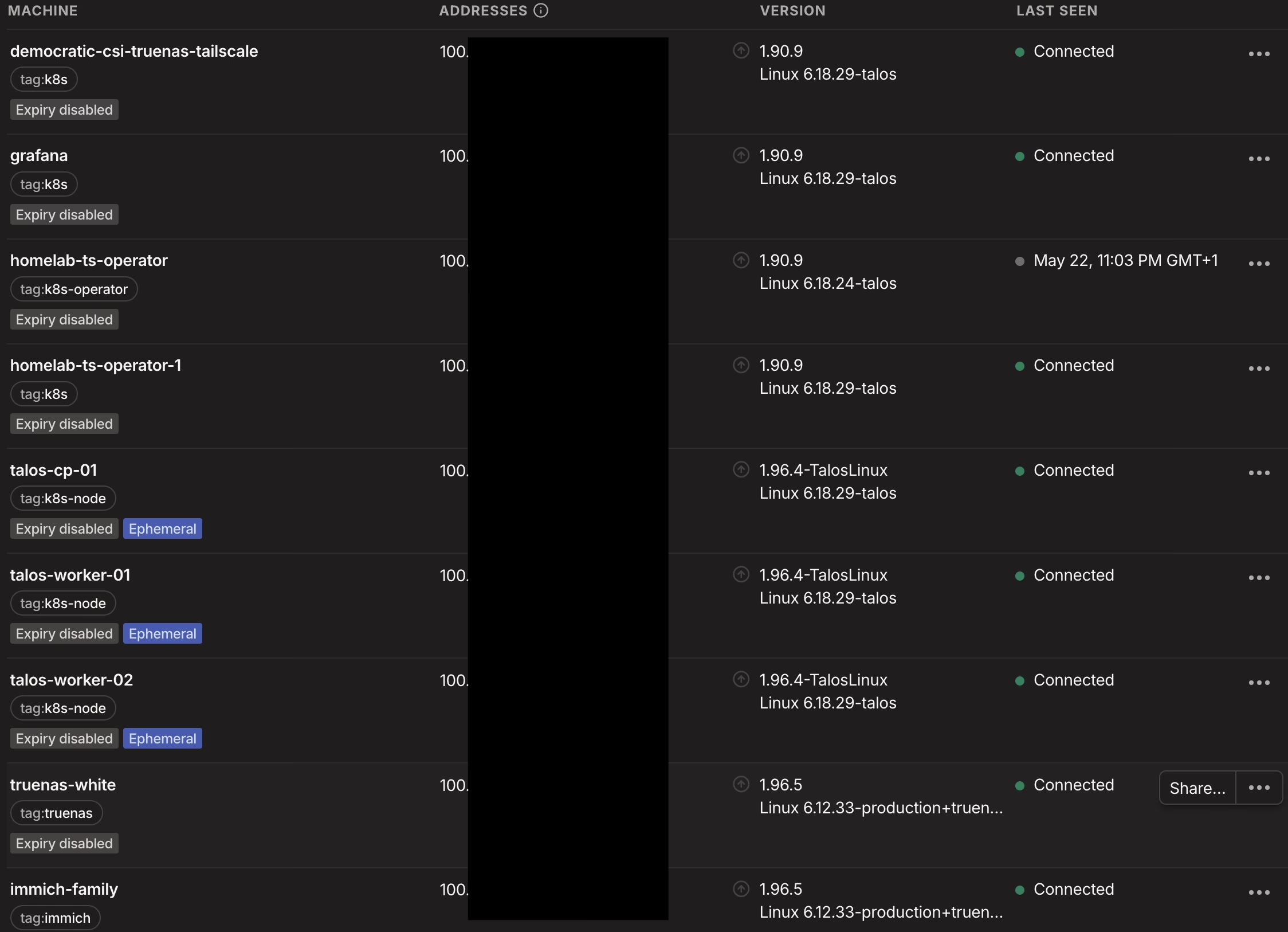
The cleanest fix was to give Immich its own Tailnet device. To do that, it needed to leave the TrueNAS apps system (which only has one tailscaled, owned by the host) and become a Docker Compose stack with a tailscale/tailscale sidecar in the same Compose network. The sidecar would join the tailnet under tag:family-immich, run tailscale serve to terminate HTTPS at the MagicDNS hostname, and proxy traffic to the immich-server container.
The Compose looks roughly like this (full version in the repo):
services:
  immich-server:
    image: ghcr.io/immich-app/immich-server:${IMMICH_VERSION:-release}
    # No `ports:` — access is Tailnet-only via the sidecar.
    ...

  immich-family-ts:
    image: tailscale/tailscale:latest
    hostname: immich-family
    environment:
      - TS_AUTHKEY=${TS_AUTHKEY}
      - TS_STATE_DIR=/var/lib/tailscale
      - TS_SERVE_CONFIG=/config/serve.json
      - TS_USERSPACE=true
    volumes:
      - /mnt/HDDs/immich/family-ts:/var/lib/tailscale
    configs:
      - source: immich-family-ts-serve
        target: /config/serve.json

configs:
  immich-family-ts-serve:
    content: |
      { "TCP": { "443": { "HTTPS": true } },
        "Web": { "$${TS_CERT_DOMAIN}:443": {
          "Handlers": { "/": { "Proxy": "http://immich-server:2283" } }
        } },
        "AllowFunnel": { "$${TS_CERT_DOMAIN}:443": false } }
Two things to call out:
network_mode: service:is a trap here. The “obvious” way to set up a tailscale sidecar is to put the app in the sidecar’s network namespace (network_mode: service:immich-family-ts). That works for single-container apps. Immich isn’t one — it needs to resolvedatabaseandredisas service-name DNS, which doesn’t work from inside the sidecar’s namespace because the sidecar runs in user-space and doesn’t have Docker’s embedded DNS. The fix is to leave both the app and the sidecar on the Compose network and have the sidecar’sserve.jsonreach the app by container name. I learned this by spending about an hour staring at “redis: name does not resolve” errors.- Family members get shared just this device. The Tailscale share UI lets me share
immich-familywith each family member’s account. They see one device in their tailnet calledimmich-family.<my-tailnet>.ts.net, and that’s it. No AdGuard, no Jellyfin, no TrueNAS UI.
I had already done this for the ImmichFrame slideshow as a kind of practise, its own sidecar, its own Tailnet device, shared to the same family members. That uses network_mode: service: because ImmichFrame is a single container and doesn’t need DNS.
The Postgres-18 booby trap
The migration came with one final surprise. The upstream Immich Compose template mounts the database volume at /var/lib/postgresql/data. That’s correct for Postgres 14, which is what their template targets.
My inherited data, from the previous TrueNAS Immich app, was on Postgres 18. Postgres 18 changed the on-disk layout: the data directory is expected to be /var/lib/postgresql, with version-numbered subdirectories underneath (e.g. /var/lib/postgresql/18/). Mounting the existing data at /var/lib/postgresql/data produced a “this looks like an empty data directory” message and Postgres helpfully initdb-ed a fresh one — which would have nuked my photos if I’d let it run.
The fix is a one-line change in the Compose:
volumes:
  - ${DB_DATA_LOCATION}:/var/lib/postgresql  # NOT /data
…and a comment block above it that’s about ten times longer than the line itself, because future-me will absolutely forget.
The Docker Hub PR that documents the change is here if you want the upstream rationale. The TL;DR is “always check the data-directory layout when bumping a major Postgres version, even if you didn’t think you were bumping it.”
What you have at the end of Part 3
- A Tailscale tag model that’s actually load-bearing, with each tag granted exactly what it needs.
- A Kubernetes cluster whose kubelet talks to the LAN, and only the LAN, for node-to-node traffic.
- A
democratic-csiinstall that can both mount NFS volumes (kubelet) and talk to the TrueNAS API (controller) over the tailnet. - An Immich (and ImmichFrame) deployment that lives as its own Tailnet device, shareable to family without exposing the rest of the homelab.
This took longer to write than I would like to admit. It also took longer to do than I would like to admit. The thing about a homelab is that nobody is paying you for it, so the only incentive to actually finish the writeup is the suspicion that future-you will need it. Future-me almost certainly will.
Onward to Part 4, the actual reward.